
Ranked #7
Promptchan
An unfiltered image and video studio, with the chat in a supporting role.
What we liked
- +The most configurable generator we've tested: styles, poses, emotions, negative prompt, visible seed
- +The community feed shows the prompt and settings behind every image, and clones in one click
- +Irish operator (VisionAI Labs Limited, Dublin): a public address, and someone identifiable behind it
- +A usable free tier: starter Gems, chat that refills every few hours, voice calls, no card
What we did not
- −Everything costs Gems: budget roughly 2 for an image, 18 for a video
- −Video (up to 39 seconds with dialogue) and custom characters are locked to the $33.99 Pro plan
- −Plans renew every 28 days, so 13 charges a year, not 12
- −The chat stays an accessory to the generator, and switching modes wipes the history
Free tier, no card required.
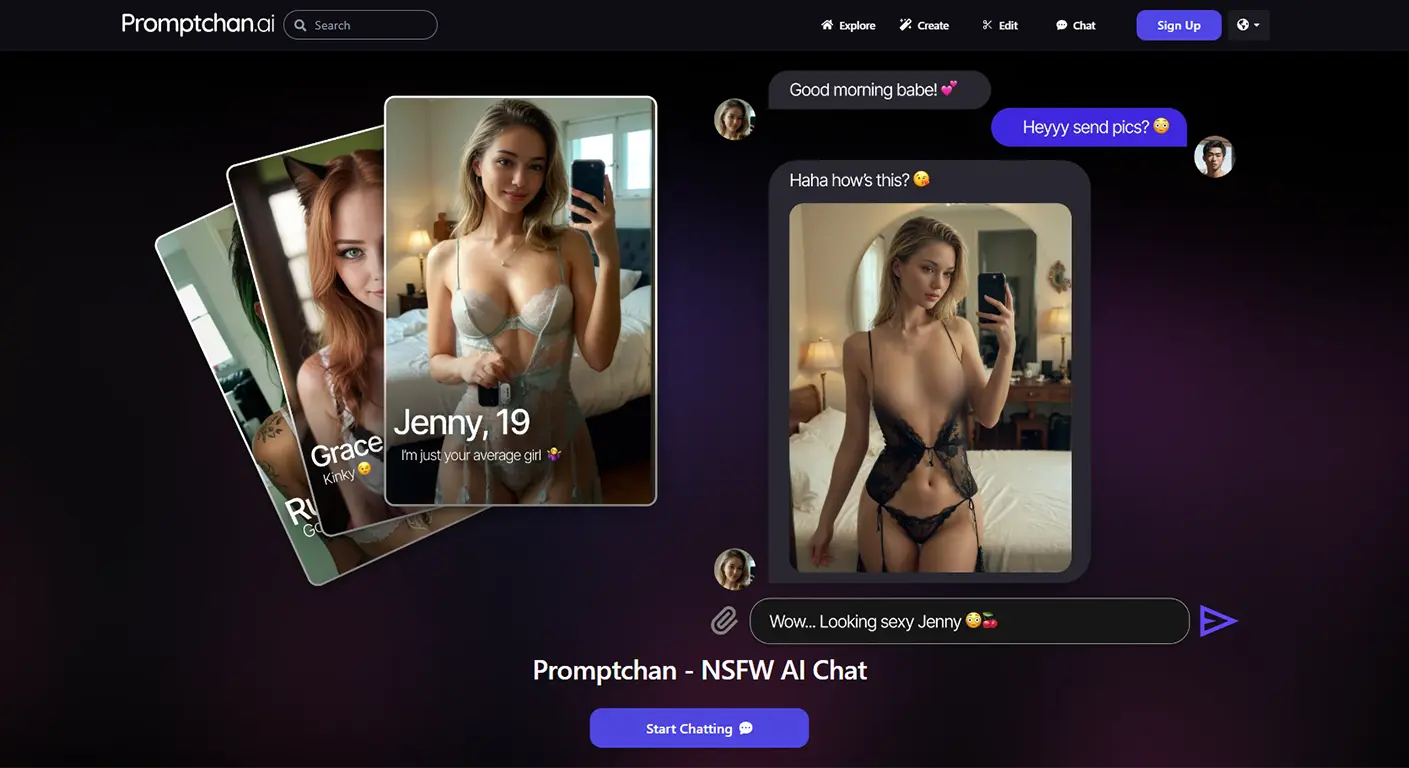
Promptchan doesn’t open on a girlfriend. It opens on a feed. Community images and videos first, characters second: this is a creation studio, not a companion. The chat is there, unfiltered, but you come to build a scene, iterate a face and push a render into motion. Checked against the official site on November 26, 2026.
Promptchan at a glance
| What it is | An uncensored AI image and video generator, with AI chat, voice and calls built around it |
| Price | Plus $14.99, Premium $23.99, Pro $33.99, each billed every 28 days |
| Included | 100, 400 or 800 Gems per period, plus 50% off extra Gems |
| Free tier | Starter Gems, chat that refills every few hours, voice calls, gallery cloning, no card |
| Video | Pro only, up to 39 seconds with dialogue |
| Adult content | Uncensored once Safe Mode is off (on by default), no real people |
| Platforms | Web, desktop and mobile browser. No store app |
| Operator | VisionAI Labs Limited, Dublin, Ireland |
What is Promptchan?
A web studio for generating adult images and videos from a text prompt, in anime or photorealistic styles. You write a prompt (or clone one from the community feed), pick a style, a pose and an emotion, and render. Then you can tweak the result, animate it into a clip, or start a chat with the character: roleplay, ask for photos or videos, send voice messages, start a call.
The homepage claims over 11 million users. Want someone to talk to in the evening? Nomi or Candy.ai fit better. Want to steer the image down to the camera angle and the pose? Few others hand you this many dials.
Promptchan’s generator, dial by dial
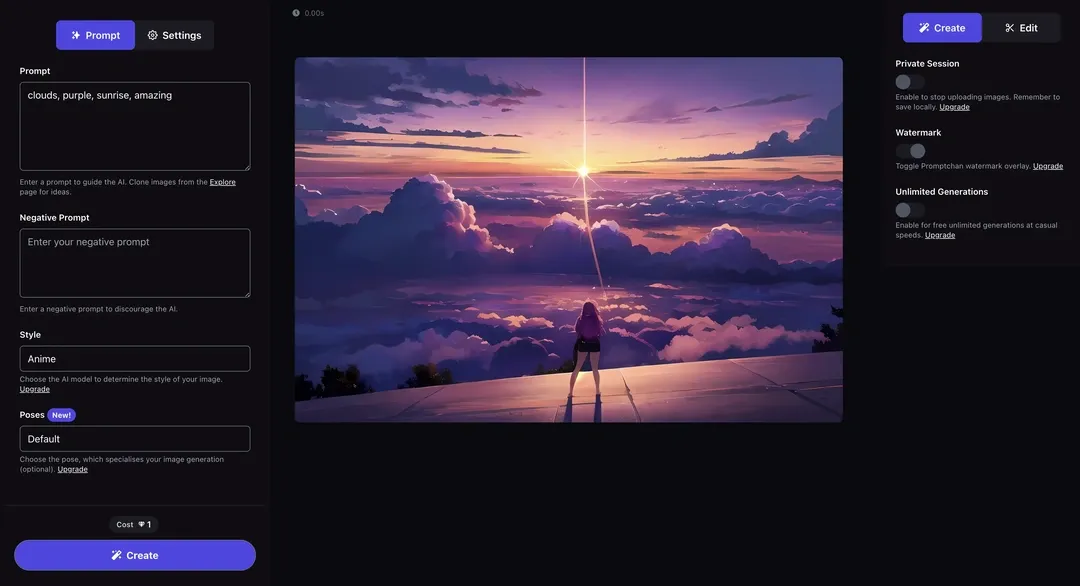
The creation screen is dense. That’s the argument, not a complaint. Model, pose, filter, emotion, aspect ratio, quality, all on one panel. Add a negative prompt (up to 250 characters) listing what to keep out: most competitors don’t give you the option.
Styles split two ways: photorealism (Real, Hyperreal, Realism XL) and anime (Anime XL, Hyperanime, K-Pop, Illustration), plus niches like Furtoon. Plans unlock them in steps: basic styles on Plus, more on Premium, all of them on Pro, with 4K images and custom poses.
A creativity slider decides how obedient the model is. Low, it sticks to the script. High, it improvises on top: useful once you’ve found a look and want variations, not copies.
The real trick sits at the bottom of the panel: pick a character you already built instead of a blank face. You’re not generating a stranger every time, you’re dropping the same character into a new scene.
The catch: quality tracks your prompt, hard. Realistic portraits can be excellent. Anime holds up more consistently than photorealism. Hands, crowded scenes, several bodies in one frame: still a coin flip, here as everywhere.
How to write a Promptchan prompt that works
Promptchan’s own prompting guide is worth five minutes. A prompt stacks in layers: subject, setting, style, medium, palette, mood, detail level. Skip one and the model fills it with something generic. The guide is blunt: the negative prompt “is the single fastest fix for most disappointing results”. List what you don’t want separately, don’t fight the main prompt.
Emphasis runs on double parentheses: ((red)) dress weights that detail harder than the rest.
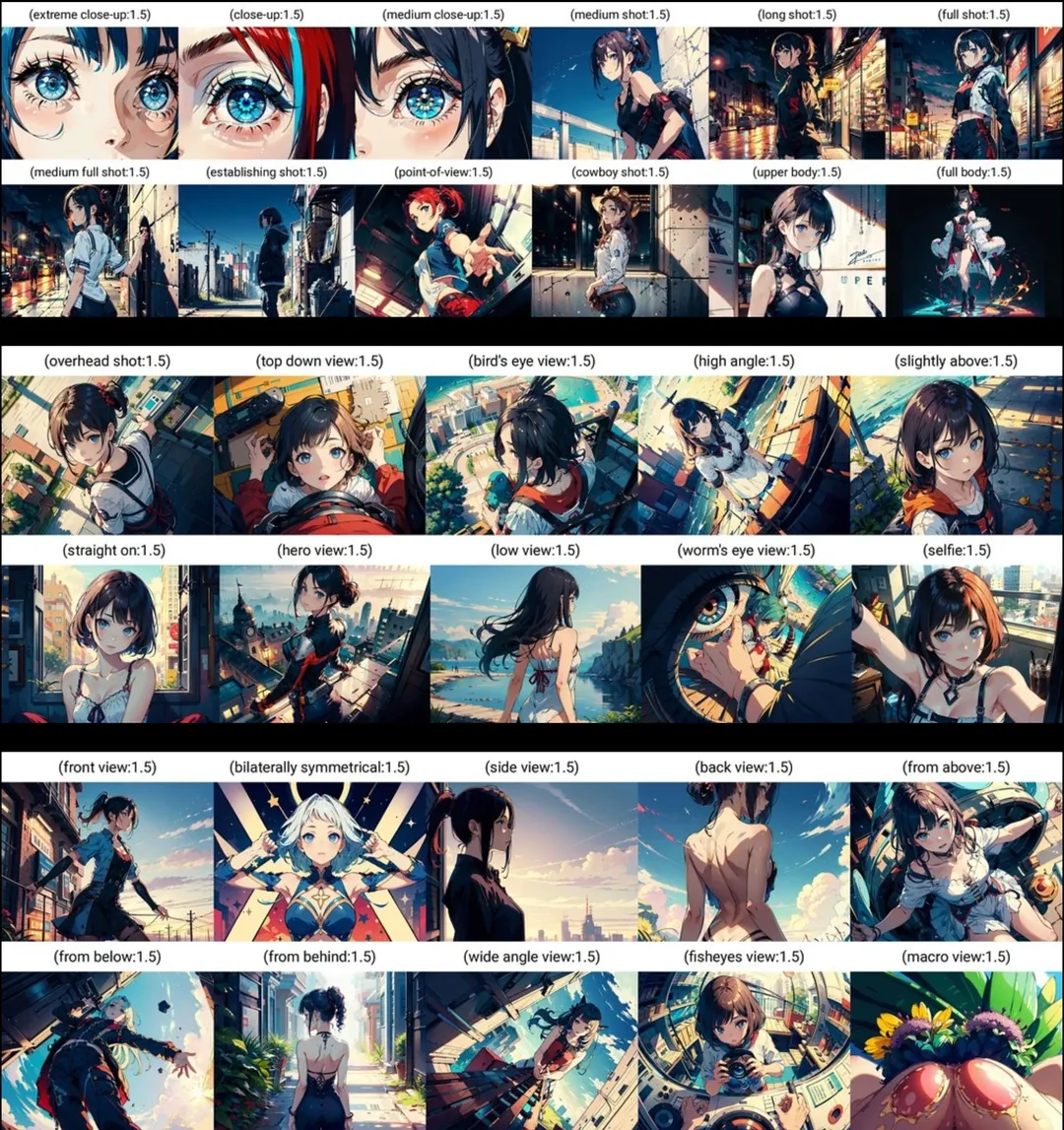
The part almost nobody documents is camera control: more than 28 named angles in three families. Distance (extreme close-up to full body), elevation (overhead, bird’s-eye, worm’s-eye), orientation (front, back, side, wide, fisheye). One keyword changes the composition more reliably than a paragraph of prose.
The method: generate, diagnose what’s off, change one variable, regenerate. Not fifty random rolls.
Fixing an image: Tweak and editing tools
Editing after the fact beats starting over. The official tool is Tweak: “describe your changes in Tweak: outfit, setting or lighting”, and the image updates without a new prompt. Third-party reviewers also describe inpainting (mask a region, regenerate just that patch, the fix for a mangled hand) and outpainting to extend the canvas.
One review (Synthlust) puts it sharper than we would: Promptchan offers “professional-level editing control comparable to desktop AI art software but in an accessible online format”. Chat-first apps treat the generator as a bonus screen. Promptchan treats it as the product.
Promptchan’s Explore feed, underrated
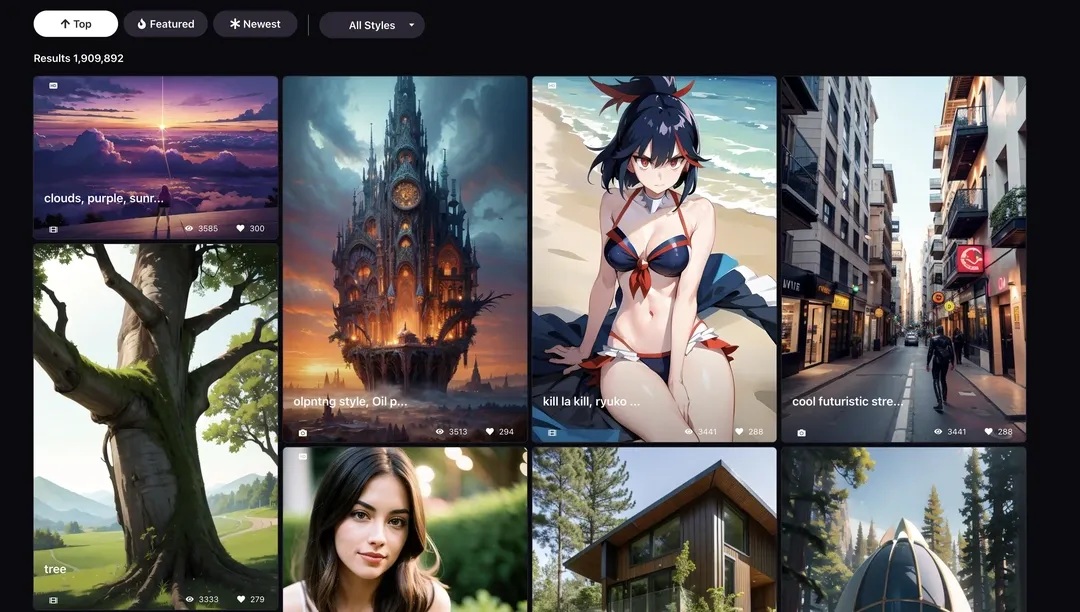
Open any public creation and you get the full prompt, format, quality, style, filter, pose, emotion and seed. Not a wall of pretty pictures: a set of instructions.
Five actions sit under every image: Clone, Animate, Tweak, Nature of use, Chat. A discovery becomes a starting point. Sortable by Top, Featured and Newest, the feed doubles as a library of prompts that already work, and cloning it is open on the free tier. Still learning to prompt? This is the best classroom we’ve found.
How much does Promptchan cost?
| Plan | Price | Gems per period | What it adds |
|---|---|---|---|
| Free | $0 | Starter Gems | Images, AI chat, voice calls, gallery cloning |
| Plus | $14.99 every 28 days | 100 | 2× chat usage, HD images, basic poses and styles |
| Premium | $23.99 every 28 days | 400 | 5× chat usage, more poses and styles |
| Pro | $33.99 every 28 days | 800 | Unlimited chat, AI video up to 39 s with dialogue, AI Character, 4K images, all and custom poses, early access |
Two things the table hides. “Every 28 days” means 13 charges a year: Plus costs about $195 a year, not $180. And every paid plan gives you 50% off extra Gems, so topping up is cheaper once you subscribe.
Be careful with numbers floating around elsewhere. Reviews quote $4.49, $5.99 or $11.99 for the entry tier: promotions, not the standing price. The pricing page says it plainly: “Any discounts appear at checkout.”
Promptchan Gems: what things really cost
The official site gives no per-item rate. From our own generations:
- An image, common configuration: around 2 Gems.
- A video, standard configuration: around 18 Gems.
- A voice message: 1 Gem. A voice call: 2 Gems.
So Plus’s 100 Gems is roughly fifty simple images, or five videos. Max quality and variations drain faster. The platform shows a Gem estimate before you commit: read it every time. Good news: “failed generations refund themselves”.
Is Promptchan free?
Yes, with no card. The official FAQ: “You get starter Gems for images, chat messages that refill every few hours and one-time tasks for extra Gems.” Voice messages and calls work on Free too, paid with Gems. You can browse and clone the whole community gallery.
What Free won’t give you: video. “Full-length AI videos, including extend, are part of the Pro plan.” One evening on the free tier is enough to check three things: the Gem cost shown before each generation, the public-or-private setting, and how far a well-written prompt, camera angle included, takes you next to a lazy one.
Promptchan’s video tool
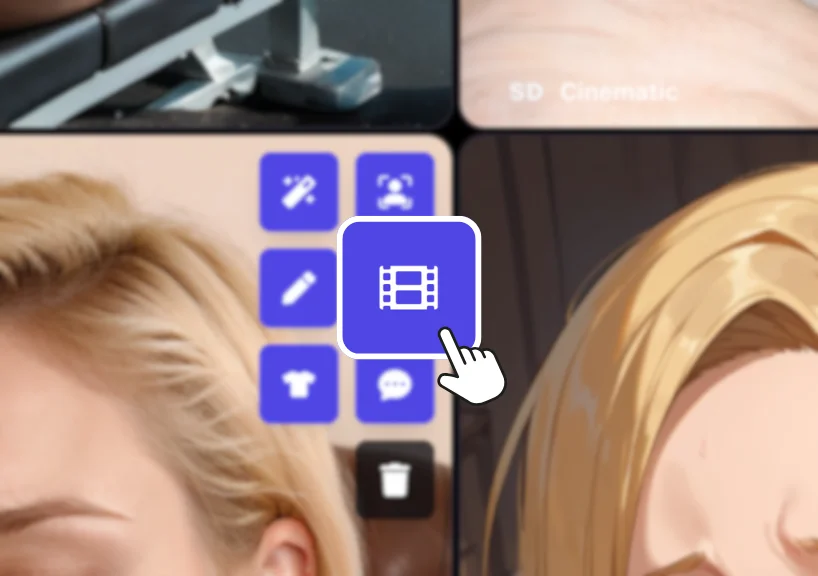
Two doors in. Text-to-video builds a clip from a written description. Image animation takes a still, yours or one cloned from Explore, and brings it to life. Extend continues a clip past where the first render stopped. On Pro, clips run up to 39 seconds, with dialogue.
Promptchan’s tutorial makes one point that matters: write the prompt for movement, not a static description. That’s the line between a stiff clip and one that convinces. Controls follow the image workflow: motion type, aspect ratio, audio on or off, quality. Generation runs in the background. One thing to know: undownloaded clips expire after 24 hours unless you publish them.
Stills still win us over more. Motion sometimes loses its naturalness, and a clip costs about nine times an image.
Is the Promptchan chat any good?
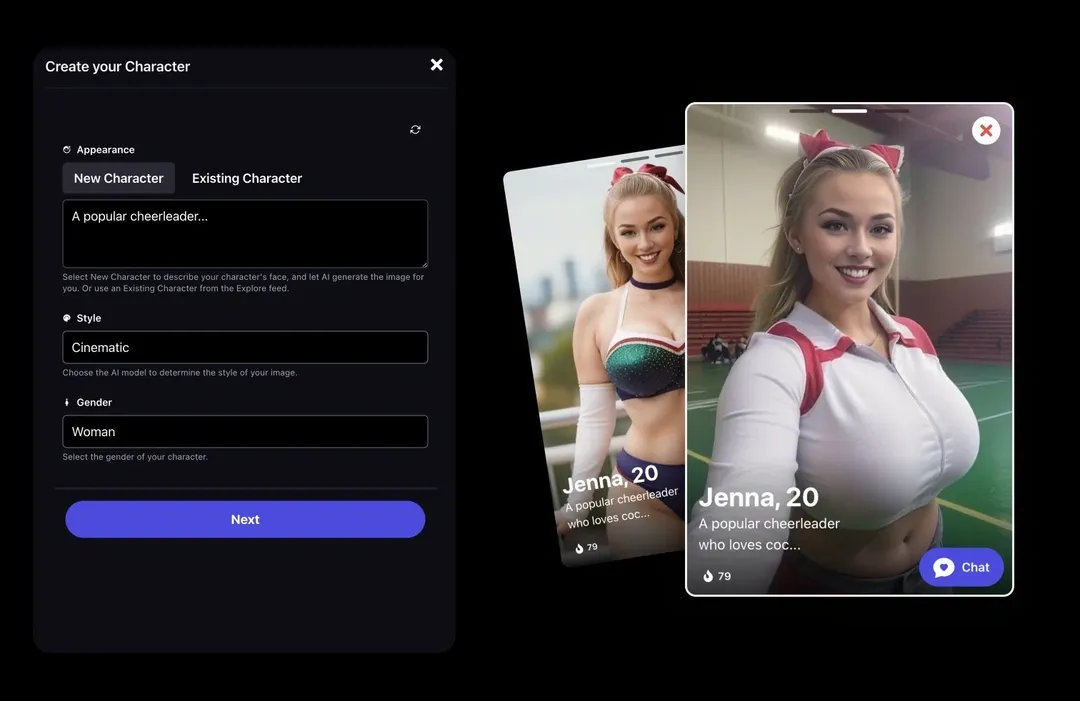
Good enough, as a front-end for the generator. Start a conversation from any character in the feed, or your own: male or female, realistic or anime. Two modes: Chat, plain texting, and Story, where you direct the scene chapter by chapter. Switching between them clears the history.
Two models sit behind it: v2.5 Pro for depth, v2.5 Fast for quick back-and-forth. More than 50 prewritten scenes drop a character straight into a situation. The feature that earns its place: generating an image mid-conversation from the context, no screen switch.
Chat volume scales with the plan: refills on Free, 2× on Plus, 5× on Premium, unlimited on Pro. Memory isn’t what this product sells, and building your own AI Character is a Pro feature. For something you’d call a relationship, Nomi holds the thread longer.
One line of lucidity: a character that remembers your day is still predicting the next word, not missing you. Worth keeping in mind before Gems start feeling like a phone bill for someone who exists.
Does Promptchan allow NSFW content?
Yes, unfiltered, nothing blurred until you pay. But there’s a switch: “Safe Mode is on for every new account.” Explicit content is allowed “only for adults who choose it: signed in, with Safe Mode off, and with proof of age where the law or we ask for it”. Turn it off in your settings and the free tier delivers explicit renders like the paid ones.
Ask for a fully naked, explicit pose on a fictional character with Safe Mode off, and it renders in one pass: no blur, no upsell screen, just the Gem count dropping.
“Uncensored” doesn’t mean lawless. Promptchan’s content policy is stricter than most on one point: it bans “any depiction of a real, identifiable person, whether a public figure or a private individual, even with their consent”, deepfakes included. Minors and non-consensual content are banned too. And “every prompt, chat message and generated picture is checked automatically”, with reporting and human moderation behind it. Stick to fictional adults.
Is Promptchan safe and legit?
Legit, and identifiable: VisionAI Labs Limited, The Black Church, St. Mary’s Place, Dublin D07 P4AX, Ireland. Against the anonymous holdings that fill this segment, that’s a real address in the EU.
- Public and private mode don’t grant the same rights. At our last reading of the terms, public mode hands Promptchan and other members a broad licence over what you publish, prompt included. Private mode claims no rights over your images or prompts. Check the mode before you generate.
- Payment: card, crypto, Telegram Stars or a redeem code. No billing descriptor stated.
- Refunds: possible within 30 days of a first or yearly payment, or 14 days of a renewal, if you’ve used fewer than 10% of the Gems it gave you. A Gem pack is refundable within 14 days if you haven’t spent any. Cancel in Settings > Plan > Cancel.
- Tracking: PostHog (session replay included), Google Analytics and Google Ads, behind consent.
Does Promptchan have a mobile app?
No. The official FAQ is explicit: “There is no Promptchan app on the App Store or Google Play, and we offer no APK.” It runs in the browser, on desktop and phone, and the site is properly built for mobile. The old iOS and Android apps are gone: any store listing using the name today isn’t official.
A developer API, if you build on top of it
Not for most readers: a public API covers image generation, chat and video behind one key, for developers wiring generation into their own product. The getting-started docs cover authentication and endpoints.
What independent reviewers say about Promptchan
- Image quality for the price. Synthlust calls it “the best uncensored image generator on the list for the price”.
- A free tier that works. Several reviews note the starter Gems are enough to test the product for real.
- The gallery is unique. AIGirlfriendRanking says Candy.ai and SoulGen have no equivalent browsable, cloneable feed of other people’s prompts.
- Anime is genuinely good. AIDateReviews calls the anime engine “among the best we’ve tested in this niche”.
Verdict
Buy Promptchan for the studio: a feed that shows its prompts, one-click cloning, editing tools, a documented camera-angle system and a direct line to animation or chat. Built to be experimented with, and few competitors manage that. Accept two things first: Gems need watching, and the chat won’t reach the depth of a real companion app.
Start free, no card. Turn Safe Mode off, watch the Gem estimate before every render, and set the mode to private. One evening tells you whether $14.99 every 28 days is worth it.

Chris Hutchinson
Writer, AI Companion List
Passionate about tech, AI, and robots, he has been trying out AI companion apps since 2026, for fun as much as for the job.
Go deeper
Alternatives to Promptchan
 Kindroid
 Nastia AI
 Crushi
 Secrets AI
Want to try Promptchan?
Start on the free tier: you will see for yourself what the conversation is worth before paying anything.
Try Promptchan for free Promptchan vs Candy.ai
 Promptchan vs Lovescape
 Promptchan vs Nomi